Features
Download MarkdownSMS Hub — Feature Overview
SMS Hub is a centralized platform for Student Affairs offices at Colorado State University to send, receive, and manage text messages with students. Each office operates its own Program, with dedicated Twilio credentials, subscribers, and messaging settings — all managed through a single web interface. As of 7/1/2026, pricing is $8.30 per 1k messages.
Dashboard & Analytics
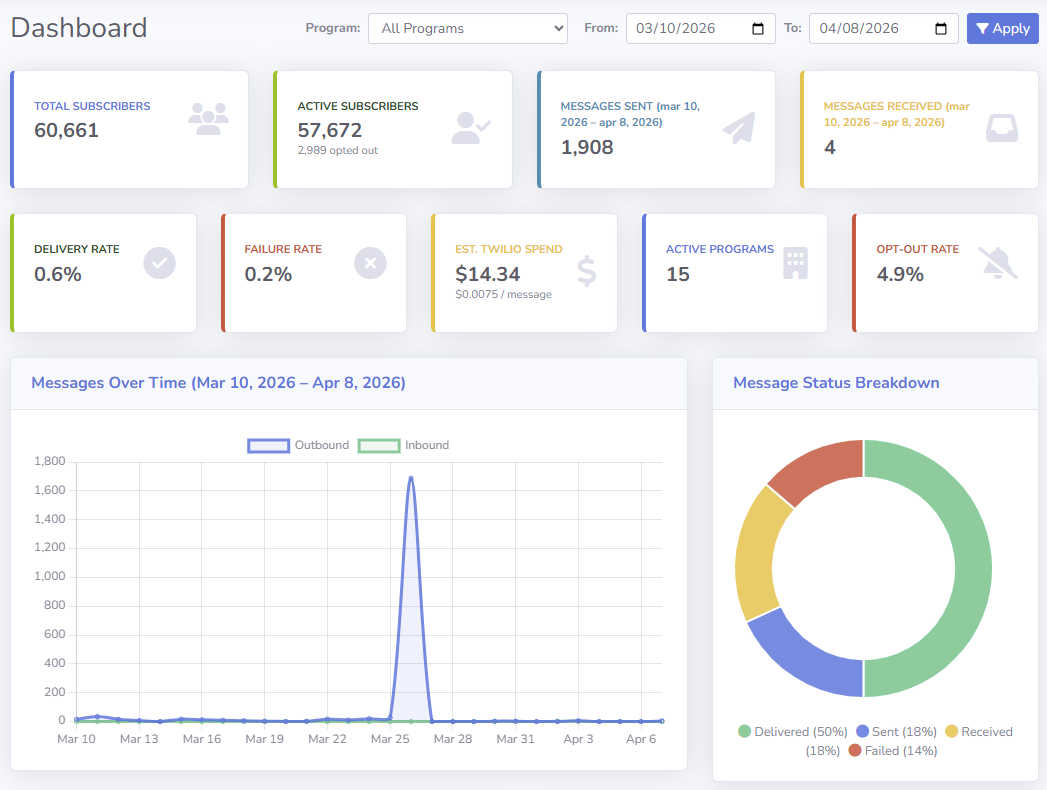
The home screen gives a real-time pulse on all messaging activity across your program (or all programs for Super Admins).
- KPI cards — Total Subscribers, Active Subscribers, Opt-Out Rate, Messages Sent, Messages Received, Delivery Rate, Failure Rate, Estimated Twilio Spend, and Active Programs count
- Drill-down links — click any KPI card to jump to the filtered Messages or Subscribers view
- Date range filter — scope all metrics to a custom date window
- Program filter — Super Admins and multi-program admins can isolate data to a single program
- Interactive charts
- Messages Over Time (outbound vs. inbound line chart)
- Message Status Breakdown (donut chart: Delivered, Sent, Failed, Undelivered, Queued, Sending)
- Messages by Program (top 10, horizontal bar)
- Subscribers by Program (top 10, horizontal bar)
- New Subscribers Per Day (bar chart)
- Inbound vs. Outbound ratio (donut chart)
- Peak Messaging Hours by time of day (bar chart)
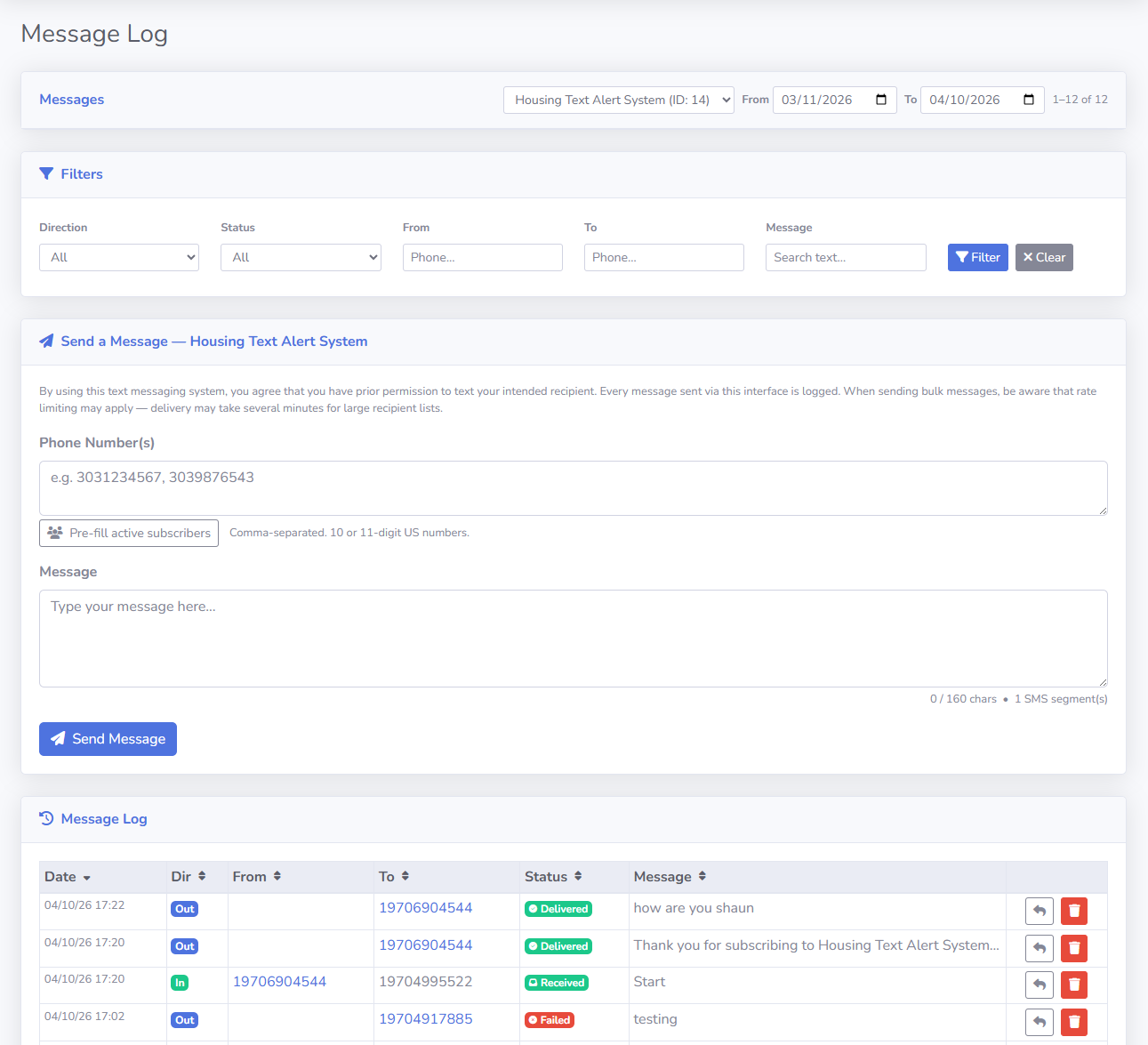
Outbound Messaging
- Single message — send a one-off SMS to any phone number
- Bulk message — send to multiple recipients in one shot
- Broadcast to all subscribers — one click populates the recipient list with every active subscriber in the program
- SMS segment counter — live character count showing how many SMS segments your message will consume (160 chars standard; 153 chars per additional segment)
- Rate limiting notice — warns when recipient list size may trigger Twilio rate limits
- Status tracking — A callback url from Twilio lets you know whether the message was successfully delivered or not and the reason why (statuses include Sent, Delivered, Failed, Received)
- All sent messages are logged automatically with timestamps, status, and Twilio Message SID
Inbound Message Handling
- Automatic reception via Twilio webhooks — no manual polling required
- Welcome message — optional auto-reply sent the first time a number texts in (configurable per program)
- Auto-reply — custom response automatically sent to every inbound message
- Custom unsubscribe message — tailored opt-out reminder
- Email forwarding — inbound responses forwarded to a configurable list of email addresses
- SMS forwarding — inbound responses forwarded to a configurable list of phone numbers
- Duplicate prevention — optional configurable time window to suppress repeated identical messages
- Developer notifications — send email alerts to a developer address on inbound or outbound activity
Message Log
A searchable, sortable, paginated record of every SMS that has passed through the system.
- Filter by direction (Inbound/Outbound), status (Queued, Sent, Delivered, Failed, Received), From/To phone number, message text, date range, and program
- Sort by any column (Date, Direction, Program, From, To, Status, Message)
- Message detail modal — click any row to view the full message including Twilio SID, timestamps, and a link to the subscriber record
- Reuse message — re-populate the send form with a prior message and recipient
- Delete message (Super Admin only) with confirmation
Subscriber Management
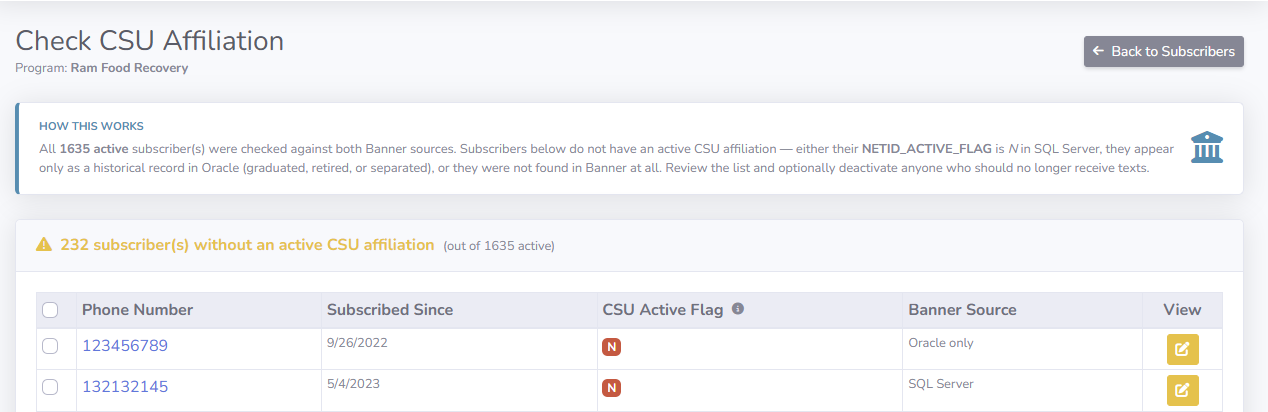
- View all subscribers with pagination and filters for status (Active / Opted Out) and phone number
- Add individual subscriber — manual entry with US phone number validation
- Bulk import — paste comma- or newline-separated numbers, or upload a CSV/TXT file (up to 500 numbers; multi-column CSVs use the first column); numbers are automatically normalized to E.164 format
- Edit subscriber — view/modify phone number, view creation/modification dates and system flags
- Subscriber message history — all inbound and outbound messages for a specific number on their edit page
- Export to Excel — download all subscriber data as a spreadsheet
- Export with demographics — download subscriber list enriched with CSU Banner data (net id, csu id, email, phone)
- Check affiliation — identify (and optionally deactivate) active subscribers who no longer appear affiliated with CSU based on Banner data
- Bulk opt-out — mark multiple subscribers as Do Not Text in one action
- Automatic failure blocking — subscribers are auto-blocked after a configurable number of consecutive delivery failures (default: 3), with an optional admin notification
- Delete subscriber (Super Admin only) — with the option to preserve or permanently delete message history
Web Opt-In / Opt-Out
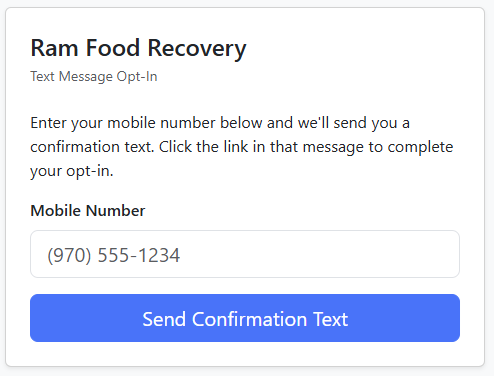
Each program can optionally expose public web links that let students opt in or out of text messages directly from a browser — no need to text a keyword to a number first.
Opt-in flow
- Admin shares the program's opt-in URL with students (e.g. in an email, on a website, or in a QR code):
/Subscribers/Public/OptIn/{ProgramSID} - Student enters their mobile number on the page
- SMS Hub texts the student a confirmation link (valid for 24 hours)
- Student clicks the link — their subscriber record is created (or re-activated if they had previously opted out) and they see a confirmation page
- If the student is already actively subscribed, the page tells them so without sending a duplicate text
Opt-out
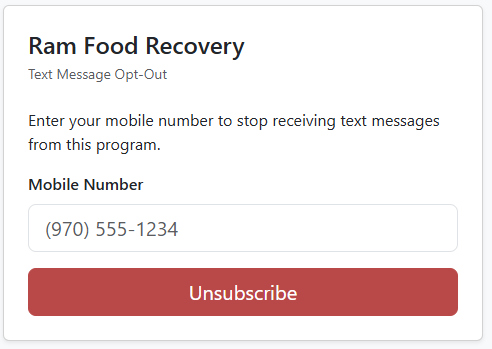
A corresponding opt-out URL (/Subscribers/Public/OptOut/{ProgramSID}) is always available for any active program. Students enter their number and are immediately unsubscribed, consistent with TCPA requirements for easy opt-out.
Per-program settings (configured in Program → Messaging Settings)
- Allow Web Opt-In — toggles the feature on or off for the program; the opt-out URL remains accessible regardless
- Require Authentication to Opt In — when enabled, students must be logged in via SSO before submitting the opt-in form (useful for programs that want to restrict enrollment to verified CSU users); opt-out never requires authentication
Security & reliability
- Confirmation tokens are single-use, 32-character cryptographic GUIDs with a 24-hour expiry
- Any previous unconfirmed token for the same program + phone is invalidated when a new one is issued, ensuring only one active link exists at a time
- Clicking a confirmation link a second time is idempotent — it shows success rather than an error
- The opt-out page never reveals whether a phone number is enrolled, preventing information disclosure
- A valid Program SID must be configured before the opt-in URL is active; the Edit page displays the ready-to-share links once a SID is set
Program Management
Each Program represents an office or initiative with its own Twilio account and subscriber list.
- Create / edit programs — name, associated office, program key & SID, contact info, and developer email
- Twilio configuration per program — Account SID, Auth Token, Messaging Service SID, and From phone number stored per-program so multiple offices can have independent Twilio accounts
- Messaging settings — enable/disable welcome message, auto-reply, email/SMS forwarding, developer notifications, duplicate prevention, failure auto-blocking, and web opt-in — all per program
- Program list — Super Admins see all programs; other users see only programs they have access to
- Deactivate programs (Super Admin only)
User Management & Access Control
- LDAP / Active Directory authentication — users log in with their CSU credentials; no separate password management needed
- Role-based access control with three tiers:
- Super Admin — full system access: all programs, user management, application logs, impersonation
- Program Admin — elevated access to their assigned program(s): can manage subscribers and program settings
- User — standard access to assigned program(s): can send messages and view subscribers
- Per-program assignment — users are granted access to specific programs, not the whole system
- Create / edit users (Super Admin only) — assign roles, activate/deactivate accounts, assign program access
- User impersonation (Super Admin only) — allows a Super Admin to act as another user for troubleshooting; a dismissible banner identifies the impersonation session; Super Admins cannot impersonate each other
REST API
SMS Hub exposes a simple REST API so other systems can trigger messages programmatically.
| Endpoint | Method | Description |
|---|---|---|
/api/TextMessages |
POST | Send a single SMS to one or more recipients |
/api/TextMessages/all |
POST | Broadcast to all active subscribers in a program |
/api/token |
POST | Generate a JWT bearer token for API authentication |
/api/inboundtwilio/{programSid} |
POST | Twilio webhook — receives inbound SMS (Twilio calls this) |
/api/delivery/{programSid} |
POST | Twilio delivery status callback (Twilio calls this) |
- All send endpoints require a Bearer JWT token in the
Authorizationheader - Legacy URL aliases (
/api/Text,/api/TextAll) are maintained for backward compatibility
Security
- Twilio webhook validation — HMAC-SHA1 signature verification on all inbound Twilio requests
- CSRF protection — anti-forgery tokens on all forms
- JWT tokens — 180-day expiration with issuer/audience validation
- Secure cookies — HttpOnly, SameSite, and Secure flags set appropriately
- ASP.NET Core Data Protection — encryption keys persisted to the database
- Authorization policies —
ProgramAdmin,SuperAdmin, andApiBearerpolicies enforced at the page and endpoint level
Health Monitoring & Logs
- Health check endpoints —
/health(simple up/down) and/health/detail(per-dependency status)- Checks: database connectivity, LDAP server, SMTP server, Twilio API
- Application logs page (Super Admin only) — view, search, filter, and delete Serilog log entries stored in SQL Server
- Filter by log level (Information, Warning, Error, Fatal) and date range
- Bulk delete by filter, truncate all, or delete entries older than one year
- Environment diagnostics — Super Admin footer shows active database server (color-coded prod vs. dev), ASP.NET environment name, BaseUrl, and PathBase
Integrations
| Integration | Purpose |
|---|---|
| Twilio | SMS sending, inbound webhooks, delivery status callbacks |
| CSU LDAP / Active Directory | User authentication |
| CSU Banner (Oracle) | Subscriber demographic lookups (affiliation, email, phone) |
| SQL Server | Primary application database |
| SMTP | Email forwarding and developer notifications |
Technical Stack
- .NET 8 — ASP.NET Core Razor Pages
- Entity Framework Core 8 — SQL Server
- Serilog — structured logging with SQL Server sink
- Twilio.AspNet.Core — SMS provider SDK
- ClosedXML — Excel export
- SB Admin 2 + Bootstrap 4 + Font Awesome 6 — UI theme
- Chart.js — dashboard visualizations
- DataTables — sortable, paginated data grids